Document checks
A useful XenoFeels guide starts with the inspection basics: compare names, species cues, entry reason, expiration details, document consistency, and any rule changes shown during the shift.
Independent XenoFeels Wiki
Use this XenoFeels wiki as a practical starting hub for the sci-fi border inspection game. Learn how to read alien documents, compare visitor details, screen suspicious vehicles, avoid unsafe downloads, and follow the official Steam listing as release information changes.
What players need first
A useful XenoFeels guide starts with the inspection basics: compare names, species cues, entry reason, expiration details, document consistency, and any rule changes shown during the shift.
XenoFeels search intent includes vehicle inspection and contraband anxiety, so this wiki organizes vehicle scan steps, suspicious cargo signals, and when to slow down before approval.
Visitors may feel harmless, nervous, confused, or suspicious. The XenoFeels inspection route should teach players to cross-check behavior with paperwork instead of guessing from appearance alone.
The strongest official-source answer is Steam. Xenofeels.blog links to the official Steam app page and avoids APKs, cracks, repacks, and download mirrors that are not verified.
Beginner guide
In XenoFeels, the most dangerous mistake is checking the visitor with yesterday's assumptions. Start every shift by reading the current rule sheet, allowed species, date rules, vehicle instructions, and any special alerts before approving the first alien.
Use a repeatable XenoFeels inspection rhythm: name, species or origin, photo or body cue, document date, entry purpose, vehicle note, then special conditions. A fixed order keeps small contradictions from slipping through.
A nervous visitor is not automatically guilty, and a strange alien design is not automatically illegal. The cleaner XenoFeels route is to mark only contradictions that conflict with the active rules or the visitor's own documents.
Vehicle checks add a second layer of evidence. Match plate numbers, cargo notes, scan results, and visitor claims before approval. If a XenoFeels case includes both paperwork and a vehicle, treat the vehicle as another document.
The best way to improve in XenoFeels is to turn penalties into rules. Record what you missed: wrong date, hidden cargo, mismatched species, false assumption, or rushed approval. Those notes become the foundation for future wiki pages.
Wiki architecture
Document pages should explain each field, the mistakes players miss most often, and how a rule update changes the approval decision.
Visitor pages should separate factual tells from unreliable assumptions so players do not approve or deny aliens for the wrong reason.
Vehicle pages should cover scan order, cargo logic, plate matching, hidden-object checks, and how vehicle evidence changes the final decision.
Inspection notes
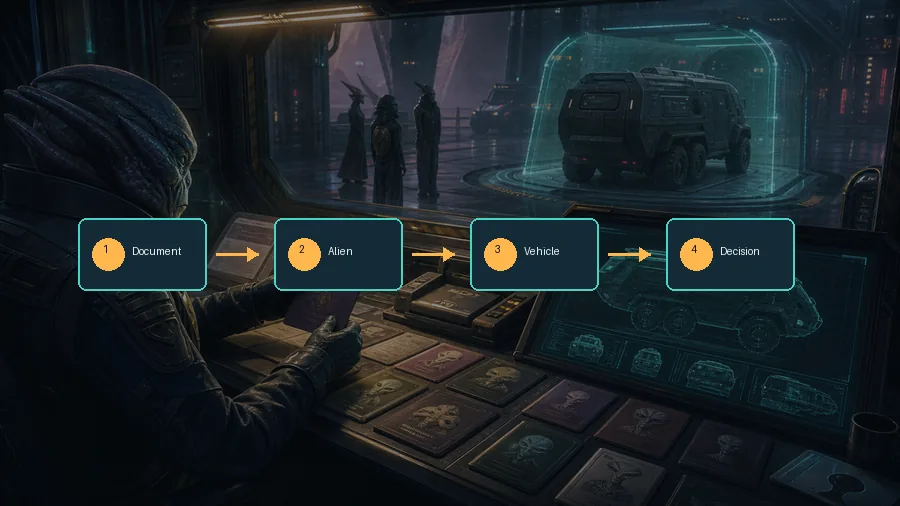
XenoFeels rewards a stable checking pattern. Speed matters only after you can finish the same document comparison without skipping fields, especially when several alien visitors share similar details.
The game's theme encourages suspicion, but the best XenoFeels decisions come from evidence. Find the mismatch, rule conflict, scan result, or missing permit before you commit.
If the active rule sheet changes, yesterday's good habit can become today's penalty. This wiki treats exact examples as version-sensitive and encourages players to verify current in-game instructions.
Searches for XenoFeels download, demo, APK, and crack can lead to unsafe pages. This guide points users to Steam and avoids unverified installers, scripts, repacks, and mobile files.
Official source
Search results show strong navigational intent for XenoFeels Steam, XenoFeels download, and XenoFeels release information. This site therefore points players to the official Steam app page for wishlist, release status, platform details, news, screenshots, discussions, and purchase information instead of mirroring unverified download claims.
XenoFeels is a focused search topic because players want three things quickly: what the game is, where the official Steam page is, and how to make better inspection decisions once alien visitors, documents, and vehicles start stacking up. This XenoFeels wiki homepage is built for those first searches. It gives a clean overview of the sci-fi inspection premise, explains a practical beginner route, and separates official-source download guidance from unsafe mirror pages. That separation matters because a XenoFeels guide should help players avoid mistakes in the checkpoint, not push them toward cracked files, fake APKs, or outdated download claims.
The main XenoFeels player intent is practical: learn how to inspect visitors without missing a small contradiction. The safest early route is to build a repeatable checklist. Read the active rules first, then compare identity fields, species or origin clues, date and permit information, entry reason, vehicle details, and any special alerts shown during the shift. A player who follows the same XenoFeels inspection order every time is less likely to approve a visitor with a bad document or deny a visitor simply because the alien looks unusual. This wiki treats observation as a decision system rather than a guessing game.
A complete XenoFeels wiki should eventually include dedicated pages for document fields, alien species notes, vehicle inspection, contraband checks, visitor behavior, shift rules, common mistakes, achievements, demo availability, official Steam updates, and safe download guidance. This homepage intentionally keeps those pages as planned clusters instead of inventing thin pages with guessed values. For example, a document page should list the field, why it matters, what a mismatch looks like, and which situations make that field easy to overlook. A vehicle page should explain plate matching, cargo consistency, scan order, and when a vehicle clue should override a visitor's spoken claim.
The XenoFeels Steam page remains the best official source for release status, screenshots, trailers, system requirements, price, demo information, news, and community discussion. Xenofeels.blog links to Steam clearly and does not host executable files, mobile APKs, cracked builds, repacks, scripts, or unofficial mirrors. Download-intent keywords around XenoFeels can be tempting, especially before or near release, but the safe answer is to use official sources only. If a demo becomes available, the correct path is still the official Steam listing or another verified developer channel, not a random file host.
The game also has a useful tool opportunity, but it should be handled carefully. XenoFeels does not currently have enough public, stable numerical data for a fake calculator, damage simulator, or economy optimizer. A future XenoFeels checklist tool could be useful if it is transparent: players could tick document fields, vehicle checks, and rule conflicts to avoid missed steps. For now, this homepage keeps the primary experience as a guide and wiki hub, then recommends future pages that can feed a real checklist or case-review tool when more verified game data exists.
For AI search and traditional search, this homepage keeps the core answer in visible, crawlable text. The main keyword XenoFeels appears in the H1, introduction, guide sections, Steam section, FAQ, image alt text, and conclusion. The page also uses structured modules instead of filler: a beginner route, checklist roadmap, inspection notes, official-source block, long-form guide copy, and FAQ. That gives XenoFeels players a real path through the site while giving the domain a clean foundation for future guide pages, safe download pages, and version-aware wiki references.
For a XenoFeels wiki, start with the inspection loop, then use the guides for alien characters, documents, vehicles, the Steam demo, and PC requirements. Verified store facts are separated from unverified APK, mobile, mod, crack, and mirror claims.
Read the XenoFeels demo download and first-run checklist.
Learn the beginner inspection order in the XenoFeels how-to-play guide.
Read the focused XenoFeels inspection guide for documents, vehicles, cargo, and final decisions.
Check the XenoFeels system requirements, Steam demo status, and safe PC download guidance.
FAQ